Operating ledger

See what needs attention. Open the source record.

Bring supported work that may need attention into one role-scoped queue, with the reason and source path kept on each row.

Get startedReview the permit clock
Queue contents depend on available records, entered facts, configured access, and supported ranking rules.
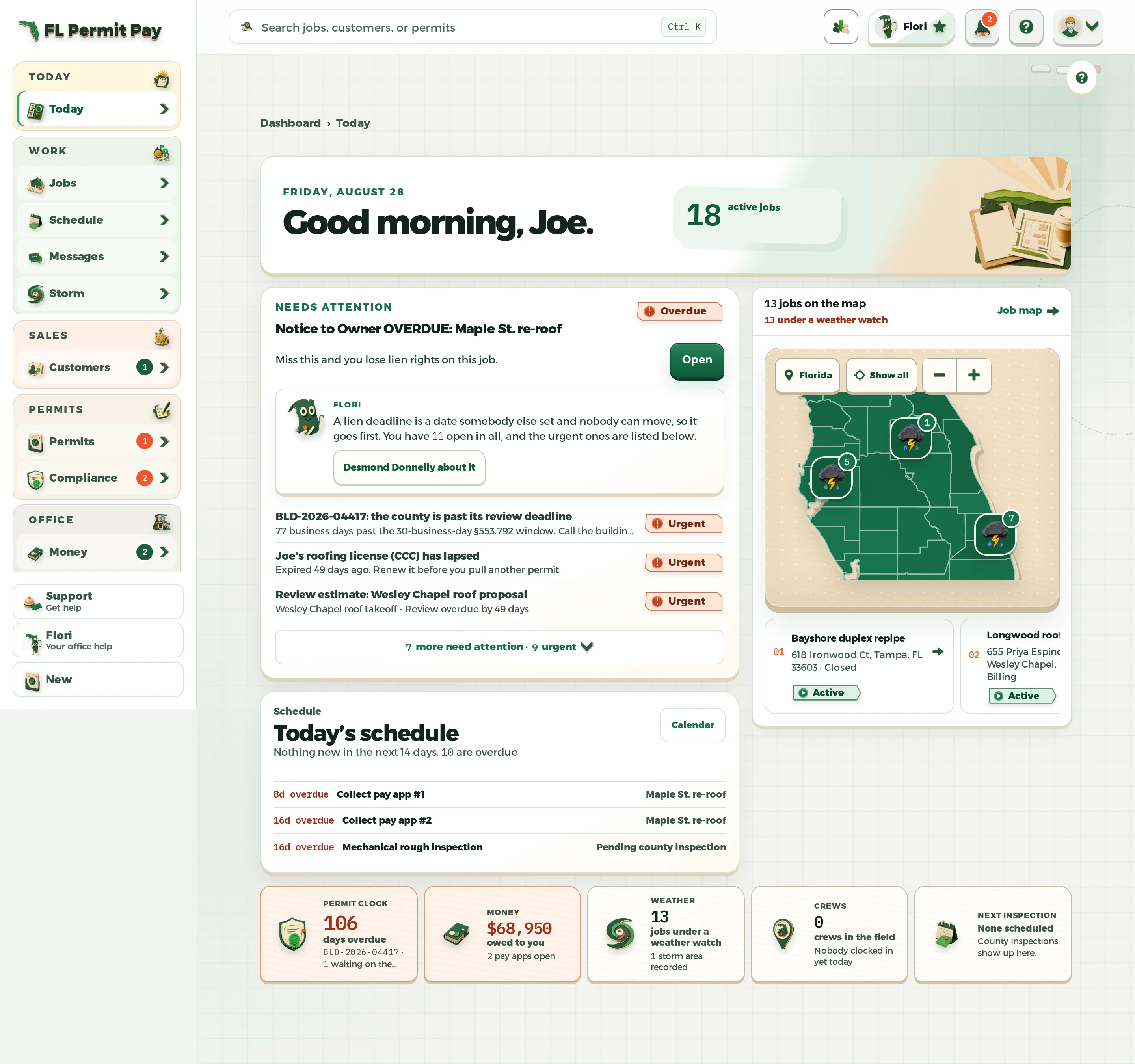
FL Permit Pay Today operating ledger with ranked work and schedule
Example dataA real FL Permit Pay Today view. The records shown are examples, not live customer data.

How the work moves

Keep attention tied to the record that caused it.

Ranking helps organize supported work; the underlying record remains the place to confirm and act.

  1. Step 1

    Start with available source records

    The queue is built only from supported records returned for the current company and role.

  2. Step 2

    Put genuine urgency first

    Supported expired, overdue, or near-term items rise above quieter informational work.

  3. Step 3

    Keep the reason on the row

    Each item carries a plain-language reason and a direct next step rather than a detached notification.

  4. Step 4

    Return to the source

    Opening an item takes the viewer to the underlying record where the supported work can be reviewed.

Next step

Start from the work that needs review.

Sign in to review the role-scoped operating queue for your company records.

The queue organizes supported records; it does not replace source review.
Get started