
 Pricing
 Sign in
From quote to signed.
Send the proposal. Keep the signature with the job.


Proposals.
Send the price, and the customer signs it.
Read it instead
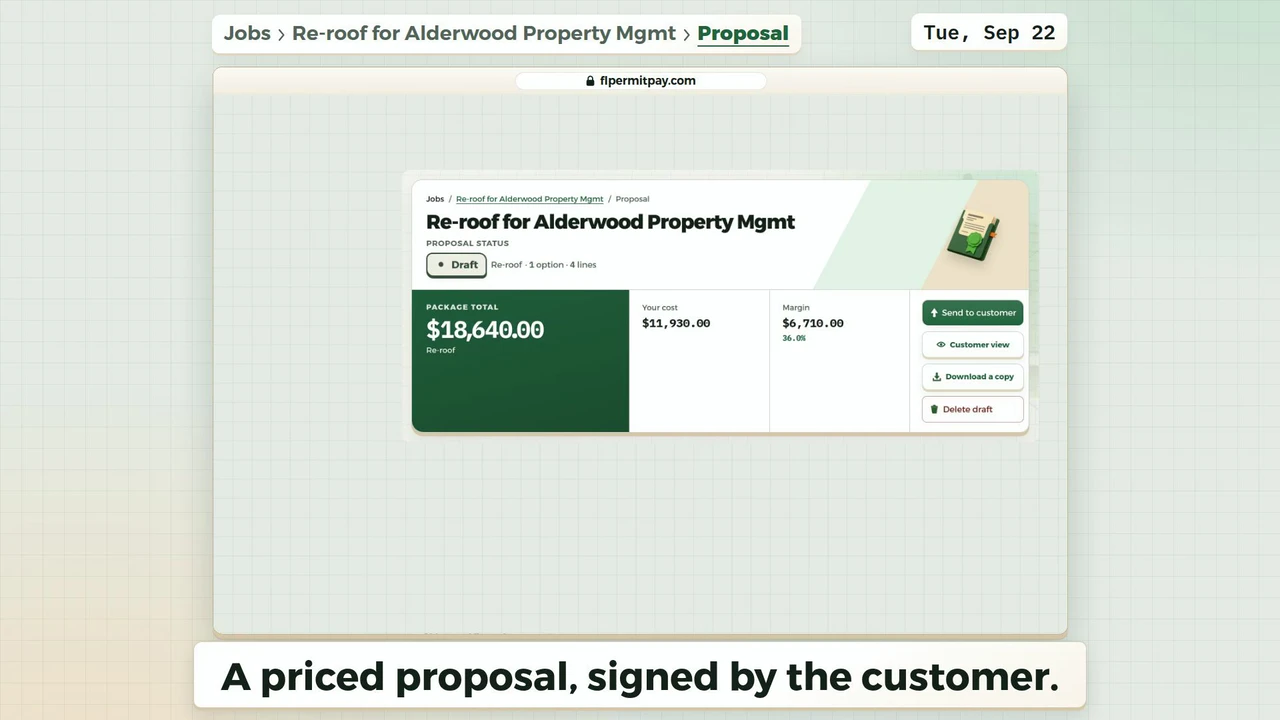
- A priced proposal, signed by the customer.
- Your draft is priced: click Send to customer.
- It shows who it goes to and the total.
- Click Send.
- Emailed. You get a note when they open it.
- The next morning the customer signs it.
- Who signed it, and how the email was checked.
- The accepted package: $18,640.00, four scope lines.
The last frame: Send your next proposal the same way. Next: Pull a permit | Permits. flpermitpay.com.
Scope to signature
Price the scopePull line items and assemblies from your materials catalog. Check it, then sendSend opens a sheet first: who it goes to, the price, and the customer's view. When it sends, the proposal says Sent, with the time. Sign with identityNo account to make. We email a 6-digit code, they type it, then sign. Accept into workSigned means the job can start. Your payment schedule becomes the job's invoices, deposit first if you set one up.



One proposal record, from draft to accepted.
Build from your catalog, then review
Line items, options and assemblies come from prices your team already keeps. We block the send until there is a linked customer and a fresh cost you have checked.
Start it from the job or the customer
Start a proposal from the job or from the customer's file, or pick the job on a new proposal. The job decides who the customer is, and only open jobs are offered. The list shows each proposal's total, and a signed one shows none there: the signed copy is what counts.
See what goes out before it goes
Send opens a sheet with who it goes to and their email, the price as the email words it, and the customer's page as they will see it. It warns you about an option with no lines or a $0 total. Send stays held while there is no customer, no email, or a customer who is not the job's. A proposal goes out only from a job, so its payment and any refund land on that job's books: with no job yet, Send becomes Link to a job first, where you pick one of the customer's jobs or start a new one right there. An older open proposal on the job can be replaced in the same step.
Share a real link, under your brand
The customer opens a private link, not an attachment that goes out of date. Your logo, your colors and your company name lead the page and the PDF. FL Permit Pay is a small credit at the bottom.
Real options, in your order
Packages are lettered Option A and Option B with a difference column, headings follow the trade, and a tiered set prints in the order you ranked it, frozen onto the proposal when you apply it.
The roof takeoff rides along
Every new proposal opens on the roof, on the customer's page and in the PDF, and says what the price rests on: a 3D scan, a hand trace on the photo, an estimate from the aerial photo or the building outline, or an imported report. Where a marked-up aerial image is on file, the PDF adds the roof as its own page with squares, pitch and runs. Treat runs the takeoff drew as a first look. The quantities say they are an estimate to confirm on site, and no accuracy figure is quoted.
Sign with evidence, then pay what was signed
Each signed proposal keeps a fingerprint of the exact document and a Signing Certificate: who signed, when, from what address, and against which version. Once signed, it can be paid. With online payments on, a Pay button charges the exact signed total into your own connected account, and FL Permit Pay never holds it. If a proposal goes quiet for three days, the job asks you to follow up.
Turn an accepted proposal into work the same day.
Start the trial with your own catalog and your own logo.